AI Zombie Generator: Turn Yourself into an AI Zombie on Video
Become an AI zombie in one upload. Choose how you turn, from a slow close-up change to a full outbreak, and get a short film starring your own face.
Updated
Trend examples made by creators and shown with their permission.
Make your zombie video
Pick an effect, add your photo and get a 15-second, multi-shot AI zombie video.
Model & video shape
By making a video, you confirm that everyone in your photos is you or an adult who agreed to be in it, and that you won’t use it to mislead or harass anyone. Content rules
Examples
Zombie AI video examples
Real clips rendered on Zombie Trend AI. Each card says what the input photo was.
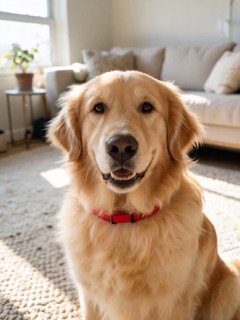
Zombie golden retriever comes home
Zombie Pet · 15s · Seedance 2.5 · 480p
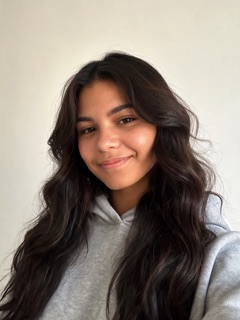
Make one like thisInput: Two AI-generated photos, no real dog or person: a golden retriever and a woman.
Zombie love story in the snow
Zombie Love Story · 15s · Seedance 2.5 · 480p
Make one like thisInput: Two AI-generated portraits, no real people: a woman (the one who turns) and a man.

What is an AI zombie?
Most people who search for an AI zombie want to see themselves, or someone they love, turned undead by AI. In autumn 2026 that became a trend: short AI films where a partner, a parent or a pet turns, and the other person refuses to fight and hugs them instead. Before the trend, the same search meant undead pictures from photo filters and image generators.
The phrase has two other meanings this page is not about. Essays use "AI zombies" for people who hand every small decision to a chatbot, and gamers use it for computer-controlled undead in shooters. If you came for a video of yourself, you are in the right place.
Five AI zombie effects, one generator
Every effect is a tested short film with its own setting, camera moves and ending. You do not write a prompt; you choose the story and the photo. Here is what each one is for:
- Transformation: a close-up change with horror lighting. Grey-green skin, dark veins and cloudy eyes take over your face. Best for one clear face photo.
- Love Story: one person turns, the other drops their guard and hugs them, then the clip cuts to a warm memory. The original trend. Use one photo of each person.
- Apocalypse: an ordinary street becomes an outbreak scene before you start to turn. Best for upper-body or full-body photos.
- Halloween: pumpkins and orange lights, a smile, then a playful undead reveal. Best for party invites and October posts.
- Pet: your dog or cat comes back as a snarling zombie, you recognize it and open your arms, and the clip cuts to a sunny memory. It takes a photo of your pet and one of you.
AI zombie generator vs. photo filter apps
Photo apps and image generators give you an AI zombie picture: makeup painted over a selfie, or a new undead portrait from a text prompt. This AI zombie generator makes video instead. The model reads your photo as a face reference and films a short scene around it, so the person who turns still looks like you, and you see them move, react and change across several shots.
Need a still as well? Pause on the frame you like and take a screenshot. If a still picture is all you want, a free photo filter may be enough; come back when you want it to move.
From an AI zombie selfie to a short film
The AI zombie short films and dramas that go viral are usually built from several clips cut together in an editing app. Each render here is already a 15-second scene with multiple shots, so one is enough for a TikTok or Reel. For something longer, render two or three effects with the same photo, for example Transformation, then Apocalypse, then Love Story, and join them in order.
The look is stylized movie makeup, not gore: no blood, no wounds, no bites. Use photos of yourself or of people who agreed to it, and never of public figures.
How to make yourself an AI zombie
Pick an effect
Transformation is preselected. Switch to Love Story, Apocalypse, Halloween or Pet if you want a different story.
Upload your photo
One clear, front-facing photo, or one of each person for Love Story and Pet. JPG, PNG or WebP up to 4 MB.
Generate and download
Keep vertical 9:16 for TikTok and Reels or pick landscape 16:9, then download your 15-second AI zombie video when it is ready.
Tips for a better AI zombie video
Match the photo to the effect
A close face photo suits Transformation and Halloween. Apocalypse looks better with your shoulders and body in frame.
Use a natural, recent photo
Heavy beauty filters and old pictures make the face drift. The AI copies what it sees, so a plain photo keeps you recognizable.
Keep it to adults who agreed
Everyone in the video should have said yes. We recommend adults only for the scarier effects.
Caption the first second
Text like "POV: the AI turned me" over the opening shot keeps viewers watching until you change.
What’s new on this page
Page published with all five undead effects: Transformation, Love Story, Apocalypse, Halloween and Pet.
Frequently asked questions
What is an AI zombie?
It is a version of a real person or pet that an AI model turns undead, using their photo for the face. In the 2026 trend it means a short video, usually a love story or a transformation.
Is there a free AI zombie generator?
Photo filter apps often have free undead pictures. This generator makes video and has no free tier: a 15-second clip costs 31 credits with MiniMax H3 (credit packs start at $9.90 for 100 credits). Credits never expire, and failed renders are refunded automatically.
Is there an AI zombie app?
You do not need to install one. The generator runs in your phone or desktop browser, and the finished video downloads straight to your camera roll or computer.
Can I turn my pet into an AI zombie?
Yes. Choose the Pet effect and upload a clear photo of your dog or cat, plus a photo of yourself in the second slot, since you play the owner in the story.
Can I write my own prompt?
No. Each effect has a fixed, tested scene so results stay consistent and safe. If you want prompts to use in other tools, see our prompt guide.
Is there an AI zombie movie?
Many short AI films and dramas like this circulate on YouTube and TikTok, mostly made by creators who join several AI clips. You can make your own 15-second scene here and add more effects to build a longer one.
More zombie AI video ideas
- AI Zombie TransformationWatch a portrait turn into a zombie step by step: grey skin, cloudy eyes, a slow head tilt.
- Zombie Love Story AITurn photos of you two into a 15-second zombie love story for an anniversary, a long-distance partner or a joke.
- Zombie Apocalypse AI VideoStar in a 15-second zombie outbreak trailer made from one photo, with a twist ending.
- Zombie Pet AI VideoThe pet version of the zombie trend: your dog or cat comes back as a zombie, and you open your arms anyway. Two-pet version too.
- Zombie AI PromptsHow the zombie trend prompt is built, a fill-in template and five original prompts to copy.
- AI Video Apps ComparedWhich app makes the viral trend clip: CapCut templates, Dreamina, PixVerse and one-click effects compared.
- Best Zombie AI Video GeneratorZombie AI video tools compared on price per video, sound, length and free options, as of October 2026.
Ready to make yours?
One or two photos, one effect, a 15-second zombie story. Credits never expire and failed renders are refunded automatically.