Best Zombie AI Video Generator: 13 Tools Compared (October 2026)
Disclosure first: we make Zombie Trend AI, one of the 13 tools below. Every other row comes from that tool’s own public pages, opened on 20 October 2026, and we say where we are not the best zombie AI video generator for you.
Updated
Trend examples made by creators and shown with their permission.
Make your zombie video
Pick an effect, add your photo and get a 15-second, multi-shot AI zombie video.
Model & video shape
By making a video, you confirm that everyone in your photos is you or an adult who agreed to be in it, and that you won’t use it to mislead or harass anyone. Content rules
Examples
Zombie AI video examples
Real clips rendered on Zombie Trend AI. Each card says what the input photo was.
Zombie golden retriever comes home
Zombie Pet · 15s · Seedance 2.5 · 480p
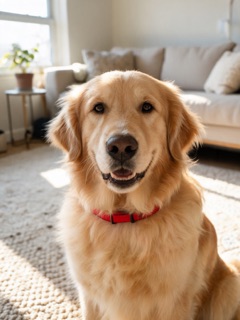
Make one like thisInput: Two AI-generated photos, no real dog or person: a golden retriever and a woman.
Zombie love story in the snow
Zombie Love Story · 15s · Seedance 2.5 · 480p
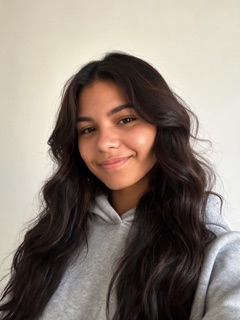
Make one like thisInput: Two AI-generated portraits, no real people: a woman (the one who turns) and a man.

Best zombie AI video generator: quick picks by need
No single tool wins every question, so here is the best zombie AI video generator for each common need, as of 20 October 2026:
- Love story, pet or bride from your photos, no prompt, in eight languages: Zombie Trend AI (ours). One or two photos, a 15-second multi-shot clip with a music score on Seedance 2.5.
- Longest clip: aizombie.org says 24 seconds with sound.
- Cheapest single video: ZombieHug (aizombie.app), $7.49 at 480p or $9.99 at 720p, with no sign-up.
- Sharper 720p from a one-step site: Zombie Video (zombievideo.org), WakePix or ZombieHug.
- Free: Dreamina for the clips and CapCut for the edit, by hand. Free Dreamina downloads carry its watermark. PixVerse also gives free daily credits.
- One person turning undead, not a hug story: SharkFoto, 10 free credits when you sign up.
- Your own story and full control: a general model such as Pika, Runway, Kling or Higgsfield, with your own prompt and an editor.
How we compared, and why it matters that we make one
We built Zombie Trend AI, so read this best zombie AI video generator list knowing that. To keep it fair we only wrote down what each tool states on its own home, effect and pricing pages, opened without signing in on 20 October 2026. Where a page did not say something, the table says "not stated" instead of guessing. Nobody paid to be listed.
We did not buy or render videos on the other sites, so this page compares facts, not picture quality. Prices are in US dollars before tax and change often; check them before you pay. Our own row comes from the same price table as the generator on this page.
Best zombie AI video generator for the trend: one-step sites
If you want the trend in one click, the best zombie AI video generator is one of these sites. They have the story built in: you upload photos, wait a few minutes and download the finished clip. None of them has a free tier, and all say their paid videos carry no watermark.
| Tool | Zombie story | One video costs | Length and resolution | Sound | Free |
|---|---|---|---|---|---|
| Zombie Trend AI (ours) | Love story, pet, two pets, bride, transformation and more; no prompt | $9.90 with Seedance 2.5 from the smallest pack, about $3.30 with MiniMax H3 | 15 s, multi-shot; 480p (Seedance 2.5) or 768p (MiniMax H3) | Music score with Seedance 2.5; not promised with MiniMax H3 | No |
| ZombieHug (aizombie.app) | Standoff, turn and hug; pet and parent versions | $7.49 at 480p, $9.99 at 720p | 15 s, several shots; 480p or 720p | Yes | No |
| Zombie Video (zombievideo.org) | Standoff, hug, wheat-field memory; pets can turn | $9.99 for one 12 s 720p video | 12 s by default (5 to 15 s); 720p, up to 1080p | Yes, music score | No |
| aizombie.org | Partner, pet, family or best friend; pick a setting | $9.99 for one video | 24 s, 9:16; resolution not stated | Yes | No |
| WakePix | Open arms, hug, golden flashback; two adults only | $9.90 for one 12 s 720p video | 12 s; 720p | Piano and street sound | No |
| SharkFoto | Single-photo undead looks only, no hug story | Plans from $10 a month; credits per effect not stated | A few seconds; not stated | Not stated | 10 credits on sign-up |
Best zombie AI video generator for free or full control: general tools
General tools have no ready-made zombie love story: you write the prompt, render several short clips and join them in an editor. You get the most control and often a free start, and you pay with time. If free matters more than time, the best zombie AI video generator for you is in this table. Our How to Do the AI Zombie Trend guide walks through that route step by step.
| Tool | Zombie preset | Cheapest paid start | Free option | Clip per render | Watermark |
|---|---|---|---|---|---|
| Dreamina (by CapCut) | No; a prompt guide recommends Seedance 2.5 | $1.50 the first month, then $15 a month | Free to start; amount not stated | Depends on the model | On free downloads; paid plans remove it |
| CapCut | Community zombie templates | Pro $19.99 a month (AI credits) | Free plan and free templates | The template’s own length | Not stated |
| PixVerse | None on its own site | $10 a month | 60 credits, then 30 a day | Not stated; Standard up to 720p | Paid plans say no watermark |
| Pika | None | $10 a month, or about $2 per 5 s 720p clip with the $25 pack | No monthly credits | 5 s at 720p | None on any plan |
| Runway | None | $15 a month; a 4 s Seedance 2.0 Pro clip uses about $3.84 of credits | 125 credits, once | 4 to 5 s | None on paid plans |
| Higgsfield | None found | $59 a month for Seedance (Plus plan) | None shown | Depends on the model | Not stated |
| Kling AI | None found | Not shown when signed out | Not shown | Not shown | Not shown |
Each zombie AI video generator in two lines
What each candidate for best zombie AI video generator does well, and what it lacks:
- Zombie Trend AI (ours): seven undead effects, from the Zombie Love Story to Zombie Pet and two-pet versions, in eight languages. You pick the model and, with Seedance 2.5, one of three scenes; a failed render refunds its credits.
- ZombieHug (aizombie.app): the cheapest single 480p video we found, no sign-up, 9:16, 16:9 or 21:9, and a 20-second remake of the original trend clip.
- Zombie Video (zombievideo.org): you choose the length (5 to 15 s) and the model, up to 1080p on its top models; packs or monthly plans.
- aizombie.org: the longest clip (24 s), several relationships and settings, a free remake if the face does not look right, and photos deleted after 30 days.
- WakePix: a gentler version with no weapon, part of a site built around AI rap duets; couples only, no pets.
- SharkFoto: many one-photo looks (zombie mode, apocalypse, zombie hand, vampire, werewolf), free credits to start, no story with two people.
- Dreamina: Seedance 2.5 and other models with your photos as references and your own prompt; the best free route if you have an evening.
- CapCut: community templates and the editor most people use to add captions and the trend’s sound before posting.
- PixVerse, Pika, Runway, Higgsfield and Kling: strong general models with no zombie preset found, so you write the prompt and stitch 4 to 5 second clips.
Where Zombie Trend AI is not the best zombie AI video generator
We would rather you pick the right tool than a wrong one, so here is where others beat us today:
- Free: we have no free tier, no free trial and no signup credits. Dreamina, CapCut, PixVerse and SharkFoto all let you start free.
- Resolution: our Seedance 2.5 love story renders at 480p, while ZombieHug, Zombie Video and WakePix offer 720p.
- Length: our clips are 15 seconds; aizombie.org makes 24.
- Your own prompt: you cannot see or change our prompts. For a story nobody else has, use Dreamina and our Zombie AI Prompts.
- No account: we need a signed-in account with a verified email; ZombieHug and WakePix say no sign-up is needed.
How to pick the best zombie AI video generator for you
Prices per credit hide a lot. Before you pay anywhere, check these points on the tool’s own page:
- Price for one finished video, not per credit or per second, and the smallest amount you must buy.
- Does the whole story fit in one render, or do you stitch 4 to 5 second clips?
- Two separate photos, one photo of both, and who turns: you or them?
- Sound in the file, or silent so you add the trend’s sound when you post.
- Length, resolution and 9:16 for TikTok and Reels.
- Watermark, refunds for failed renders, and how long your photos are kept.
Sources (checked on 20 October 2026)
We opened these pages without signing in: zombietrendai.org/pricing; aizombie.app; zombievideo.org and zombievideo.org/pricing; aizombie.org; wakepix.com/zombie-love-story-ai-video and wakepix.com/pricing; sharkfoto.com/ai/effects/ai-zombie-filter and sharkfoto.com/pricing; dreamina.capcut.com/ai-video/zombie-ai-video-trend; capcut.com/pricing; app.pixverse.ai/subscribe; pika.art/pricing; runway.com/pricing; higgsfield.ai/pricing; kling.ai. Spotted a change? Tell us and we will update the table.
How to make a zombie AI video here in 3 steps
Add your photos
One clear photo of the person who turns and one of the person who hugs, or one photo of both of you (the person on the left turns). For a pet, add your pet and yourself.
Pick the effect and model
Keep Zombie Love Story or pick Pet, Transformation, Apocalypse or Halloween Zombie. Choose Seedance 2.5 for the music score or MiniMax H3 for fewer credits, in 9:16 or 16:9.
Generate and download
Wait about 2 to 7 minutes, download the 15-second MP4 from My videos and post it with a caption.
Tips before you choose the best zombie AI video generator
Watch the example clips
Every one-step site shows samples. Look for faces that stay the same person from the first shot to the hug.
Start small
Buy the smallest pack or single video first, on any site, and see whether the result looks like you.
Use clear, front-facing photos
Eyes visible, no sunglasses or heavy filters, one person per photo. Every tool keeps faces better that way.
Ask first
Only use photos of yourself, of adults who agreed, or of your own pet. Never strangers, celebrities or public figures.
What’s new on this page
Page published: our best zombie AI video generator comparison, 13 tools compared from their own pages (one-step zombie sites and general AI video tools), quick picks by need, where we are not the best choice, and our sources.
Frequently asked questions
What is the best zombie AI video generator?
For the viral zombie love story from your own photos, a one-step site is the best zombie AI video generator: Zombie Trend AI (ours), ZombieHug, Zombie Video, aizombie.org or WakePix give you the whole story in one clip with sound. For free and full control, use Dreamina with CapCut.
Is there a free zombie AI video generator?
Not among the one-step zombie sites we checked. Free routes exist: Dreamina is free to start (free downloads carry its watermark), CapCut has free templates, PixVerse gives 60 credits and then 30 a day, and SharkFoto gives 10 credits on sign-up. Zombie Trend AI has no free tier.
How much does a zombie AI video cost?
On the one-step sites, roughly 7.50 to 10 US dollars for one video. Here a 15-second video costs 98 credits with Seedance 2.5 or 31 to 32 credits with MiniMax H3 (credit packs start at $9.90 for 100 credits); credits never expire and a failed render is refunded automatically.
Which is the best zombie AI video generator with sound?
Zombie Trend AI with Seedance 2.5, ZombieHug, Zombie Video, aizombie.org and WakePix all say their clips come with music or sound. CapCut templates come with the creator’s song.
Which one makes the longest zombie video?
aizombie.org says 24 seconds. Zombie Trend AI and ZombieHug make 15 seconds, Zombie Video and WakePix 12 by default. General tools render about 4 to 5 seconds at a time, so you join several clips.
Why should I trust a comparison written by one of the tools?
You should check it. For this best zombie AI video generator comparison we wrote down only what each tool states on its own pages, dated every table, listed our sources and named where others beat us. Picture quality is not ranked, because we did not render on the other sites.
Can I make the zombie trend with my pet?
Yes, on Zombie Trend AI (Zombie Pet and a two-pet version), Zombie Video, aizombie.org and ZombieHug. WakePix’s zombie love effect is for two adults only.
More zombie AI video ideas
- AI Video Apps ComparedWhich app makes the viral trend clip: CapCut templates, Dreamina, PixVerse and one-click effects compared.
- How to Do the AI Zombie TrendThree ways, step by step: Dreamina with your own prompt, CapCut for the edit, or one click from your photos.
- Zombie Love Story AITurn photos of you two into a 15-second zombie love story for an anniversary, a long-distance partner or a joke.
- Zombie Pet AI VideoThe pet version of the zombie trend: your dog or cat comes back as a zombie, and you open your arms anyway. Two-pet version too.
- AI Zombie GeneratorAll five undead video effects in one place: pick a story, upload a photo, get a 15-second clip.
- Zombie AI PromptsHow the zombie trend prompt is built, a fill-in template and five original prompts to copy.
Ready to make yours?
One or two photos, one effect, a 15-second zombie story. Credits never expire and failed renders are refunded automatically.